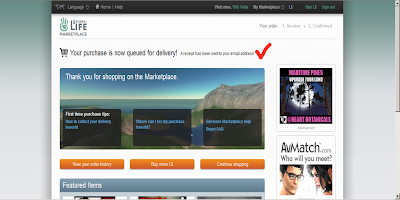
I'm suspecting that the Marketplace has grown harder for some to navigate, especially with giftgiving. There seem to be too many steps now between finding a perfect gift, and completing the transaction. So many of the pages in between are confusing as they give uneccessary space to irrelevant advertising, and the option to bestow a gift is pretty well hidden.
I've been working hard to improve signage instore, and using links to the Marketplace to make giftgiving easier. There's now a notecard to be picked up at the landing point which shows the steps clearly...but here they are....
Over each of the signs in the Mainstore (Sinaburoe) is a new "helper sign". Touch the button on the top right, and a blue drop-down window will appear in your top right. Click "Go to page".
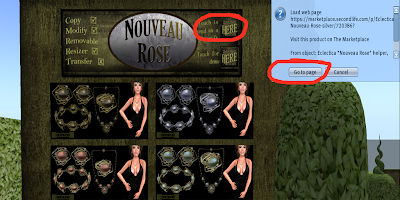
This will open the corresponding Marketplace window in your web browser. One set from the range you want will be shown at the top of the page. Make sure you are logged in.
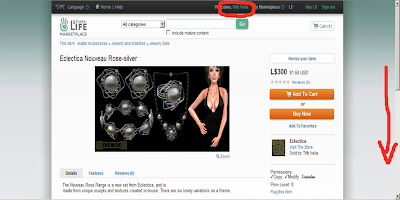
For a different colour, scroll down to find the one you prefer under "related items". Click on the one of your choice.
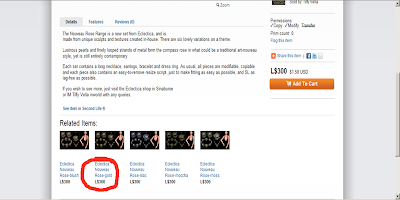
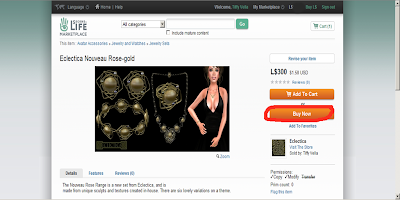
This will take you to the correct colour (this example is "Eclectica Nouveau Rose Gold"). You can choose "add to cart" for multiple purchases, however "Buy Now" may be simpler for single purchases.
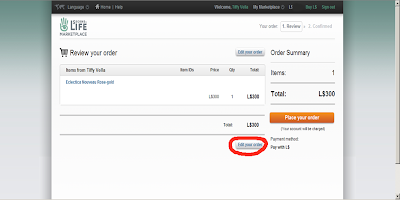
This will take you to the next page, as shown. Click "Edit your order" (This is hiding stupidly down the bottom, and this page really ought to have a big orange button saying "Send as a Gift". I suspect this is where we are all losing sales).
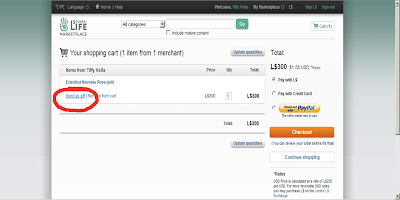
On the next page (shown) check that the price and amount is correct. Then, to the left, select "Send as a gift". (Again, where is the big orange button?)
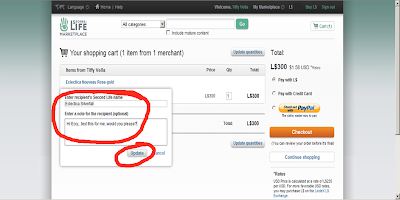
A little window pops up, which lets you add your friend's name, and a nice message. "Update" it when it's done.
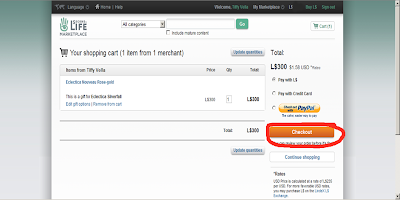
Here's the next page. Check it's all correct. Then use the "Checkout" button. The next step is final, and you may wish to ensure that your friend is inworld, expecting the gift, and not in busy mode.
And it's done...you reach the confirmation window, and your account will be deducted. Congratulations...you just sent a gift!